How a Browser Works: A Beginner-Friendly Guide to Browser Internals

Learning web development in public. Writing simple, real-world explanations about web development concepts. Helping beginners understand why things work, not just how.
What Happens After I Type a URL and Press Enter?
Let’s start with a question we almost never pause to think about:
What actually happens after I type a URL and press Enter?
It feels instant.
The page appears.
We move on.
But inside the browser, a surprisingly beautiful chain of events unfolds — not magic, but well-orchestrated engineering.
Let’s walk through that journey slowly, visually, and without drowning in specifications.
A browser is not one thing — it’s a team
A browser is often described as “software that opens websites”, but that’s an oversimplification.
A browser is more like a team of specialists working together:
One handles what you click and type
One talks to the internet
One understands HTML and CSS
One runs JavaScript
One paints pixels on your screen
None of them work alone.
They coordinate constantly.
High-level browser architecture (big picture)

At a high level, this is what’s inside a browser:
User Interface: address bar, tabs, buttons
Browser Engine: the coordinator
Rendering Engine: turns code into visuals
Networking: fetches files from servers
JavaScript Engine: executes JS
Graphics system: paints pixels
Don’t try to memorize names.
Just remember: each part does one job well.
Step 1: You type a URL and press Enter
When you type something like:
https://example.com
You’re essentially telling the browser:
“Go get whatever lives at this address.”
The browser immediately starts talking to the internet:
DNS resolves the name
A connection is opened
An HTTP request is sent
Soon, files start arriving — HTML, CSS, JavaScript, images, fonts.
The most important one is HTML.
Step 2: HTML arrives — but nothing is shown yet
This surprises many beginners.
When HTML arrives, the browser does not display it immediately.
First, it needs to understand it.
To understand HTML, the browser parses it.
What does parsing actually mean?
Parsing simply means:
Breaking something down and understanding its structure.
Think about reading a sentence.
You don’t see random words.
Your brain understands meaning, relationships, and hierarchy.
The browser does the same with HTML.
HTML → DOM (Document Object Model)
As the browser reads HTML, it builds a tree-like structure called the DOM.

Think of the DOM as:
A family tree of the page
Elements are parents and children
Nesting matters
Structure becomes clear
The DOM is not the HTML text — it’s the browser’s internal understanding of the page.
Step 3: CSS arrives and gets its own understanding
While HTML is being parsed, CSS files are also downloaded.
CSS needs structure too.
So the browser parses CSS and builds something called the CSSOM.
🎭CSS → CSSOM (CSS Object Model)
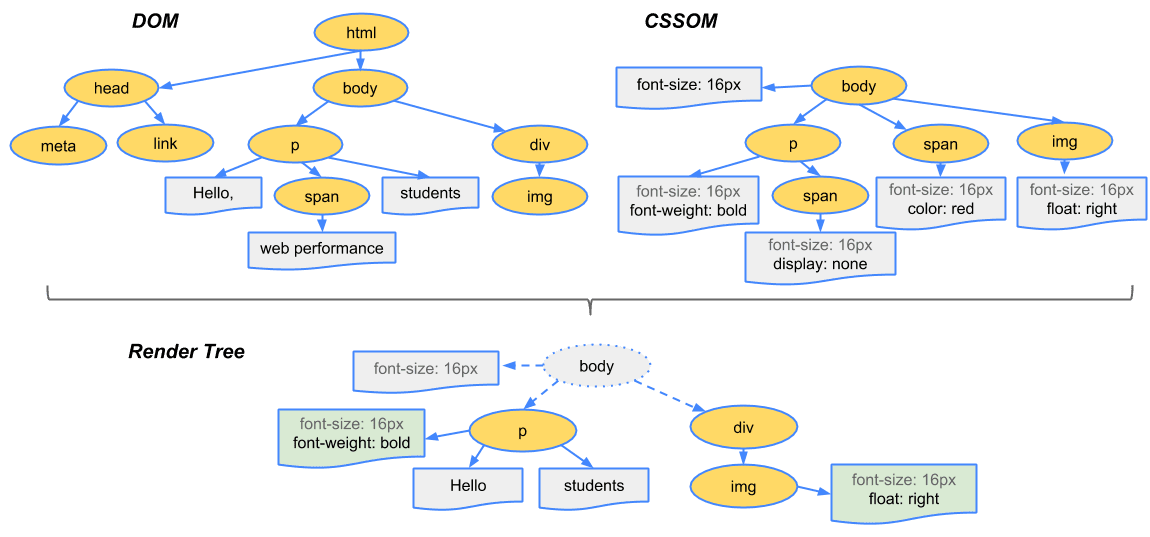
CSSOM answers questions like:
Which styles apply to which elements?
What wins when rules conflict?
What is the final color, size, and layout?
Without CSSOM:
Everything would look plain
No spacing, no colors, no design
Step 4: DOM and CSSOM meet → Render Tree
HTML defines what exists.
CSS defines how it looks.
The browser combines both to form the Render Tree.

The render tree:
Contains only visible elements
Has final styles applied
Is ready to be drawn
This is where structure turns into something visual.
Step 5: Layout (also called reflow)
Now the browser asks practical questions:
Where should this element be?
How wide is it?
How tall?
What comes next to it?
This calculation step is called layout or reflow.

Layout is expensive because:
Elements depend on each other
A small change can affect many parts of the page
Step 6: Painting
Once layout is done, the browser starts painting.
Painting means:
Filling colors
Drawing text
Rendering borders, images, shadows
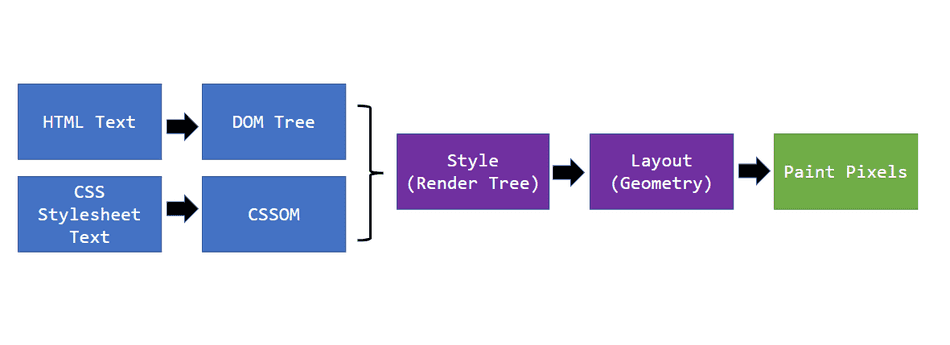
At this stage, things finally begin to look like a webpage.
Step 7: Display (compositing)
Finally, painted layers are:
Sent to the GPU
Combined efficiently
Displayed as pixels on your screen
This is the moment you actually see the page.
A simple parsing example (no HTML)
Let’s understand parsing with something familiar.
Expression:
2 + 3 * 4
If read blindly:
(2 + 3) * 4 = 20 ❌
But parsing understands structure:
2 + (3 * 4) = 14 ✅
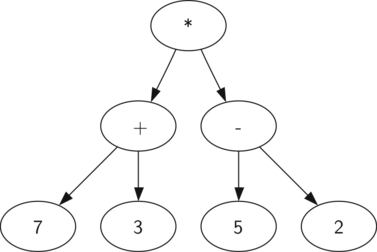
Parsing always means:
Read input
Apply rules
Build structure
Extract meaning
HTML parsing works the same way.
Full flow: from URL to pixels
Let’s put everything together.
URL typed
 ↓
Network requests
 ↓
HTML → DOM
CSS  → CSSOM
 ↓
Render Tree
 ↓
Layout
 ↓
Paint
 ↓
Pixels on screen
A note for beginners (important)
If this feels like a lot — that’s okay.
You are not expected to remember everything.
What matters is:
You understand the journey
You stop thinking “it just works”
You start seeing the browser as a system
With time, each piece becomes familiar.
Final thoughts
A browser is not just a viewer.
It is:
A network client
A parser
A renderer
A coordinator
A graphics engine
Once this flow clicks, frontend development stops feeling like magic and starts feeling like engineering.
And that’s the real win.

